
Paste your CSV, or choose a .csv file, and get a clean
PDF table: the header on every page, numbers lined up, every other row shaded,
and page numbers. Every PDF is accessible (PDF/UA), the table
tagged for screen readers. Free, no sign-up.
The example above becomes this PDF (from sales.csv):
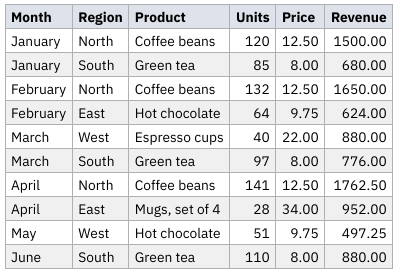
CSV to PDF is built on PDFjet's BigTable, which writes tables of any number of rows with flat memory: each page is written as soon as it is full. PDFjet is the PDF library for Java, .NET, Go and Swift. Make your own PDFs from your data, in your own program. For Markdown, try Markdown to PDF.
©2026 PDFjet Software.